
Gathering the Data
Identify Sources
Challenge
When I first started this project, I assumed there might only be a dozen militaria websites out there. Collecting felt like such a niche hobby that I didn’t expect much data to work with. Instead, I discovered a surprisingly large and diverse network of dealers — some selling broad ranges of militaria, others specializing in just one thing, like flags, medals, or even cookware. Many of these shops were small, often run by a single person, which meant product data varied wildly in quality and format. That inconsistency quickly became one of the biggest hurdles.
Solution
To keep the data focused and manageable, I chose to target independent militaria stores instead of giant platforms like eBay, Amazon, or Facebook. While those had scale, they also came with too much noise, scraping complexity, and legal grey areas. By concentrating on smaller shops, I could build a dataset that was both cleaner and more meaningful. Over time, I grew the list to about 100 trusted websites, each catering to different corners of the collecting community.
Result
What started as a hunch turned into a mapped ecosystem of militaria dealers, from mom-and-pop shops to niche specialists. This gave me the diverse, real-world data I needed — messy, but relevant — and provided the foundation to start structuring and analyzing the market.
Once I had the right data sources, the next step was to design a scraper that could handle their diversity.

(Photo: One of my favorite shops before it closed — exactly the kind of independent source this project was built on.)
Build the Scraper
Challenge
Every militaria site does things differently — messy HTML, hidden price structures, inconsistent “sold” markers, and image galleries that never follow the same rules. On top of that, I needed to track changes over time instead of overwriting data. The real challenge was building something that could handle 100+ unique layouts without me constantly rewriting code.
Solution
I built a Python scraper framework that runs on AWS EC2 and is driven by JSON configs. Instead of hardcoding, I define selectors, price rules, and availability logic per site. Each site gets its own config file, which keeps the core logic clean and safe.
The scraper went through three major refactors as I learned what worked and what didn’t:
Started on a Raspberry Pi → moved to AWS for stability and storage.
Replaced fragile
eval()parsing → JSON config system that’s secure and maintainable.Redesigned the database → now stores historical price/availability changes instead of overwriting them.
I also tuned performance so the system could run constantly without burning money or stressing dealer servers:
Reduced server load by only pulling full details when changes were detected.
Improved image/price extraction across dozens of layouts.
Scheduled lightweight checks every 10 minutes, plus full refreshes every 12 hours.
Result
The current system processes 350k+ products across 100+ sites. Adding a new site means writing a JSON config, not touching the scraper code. The framework is now flexible, efficient, and production-ready — the foundation for everything else in this project.
With the framework in place, I turned to optimizing how it actually worked day-to-day

Optimizing the Workflow
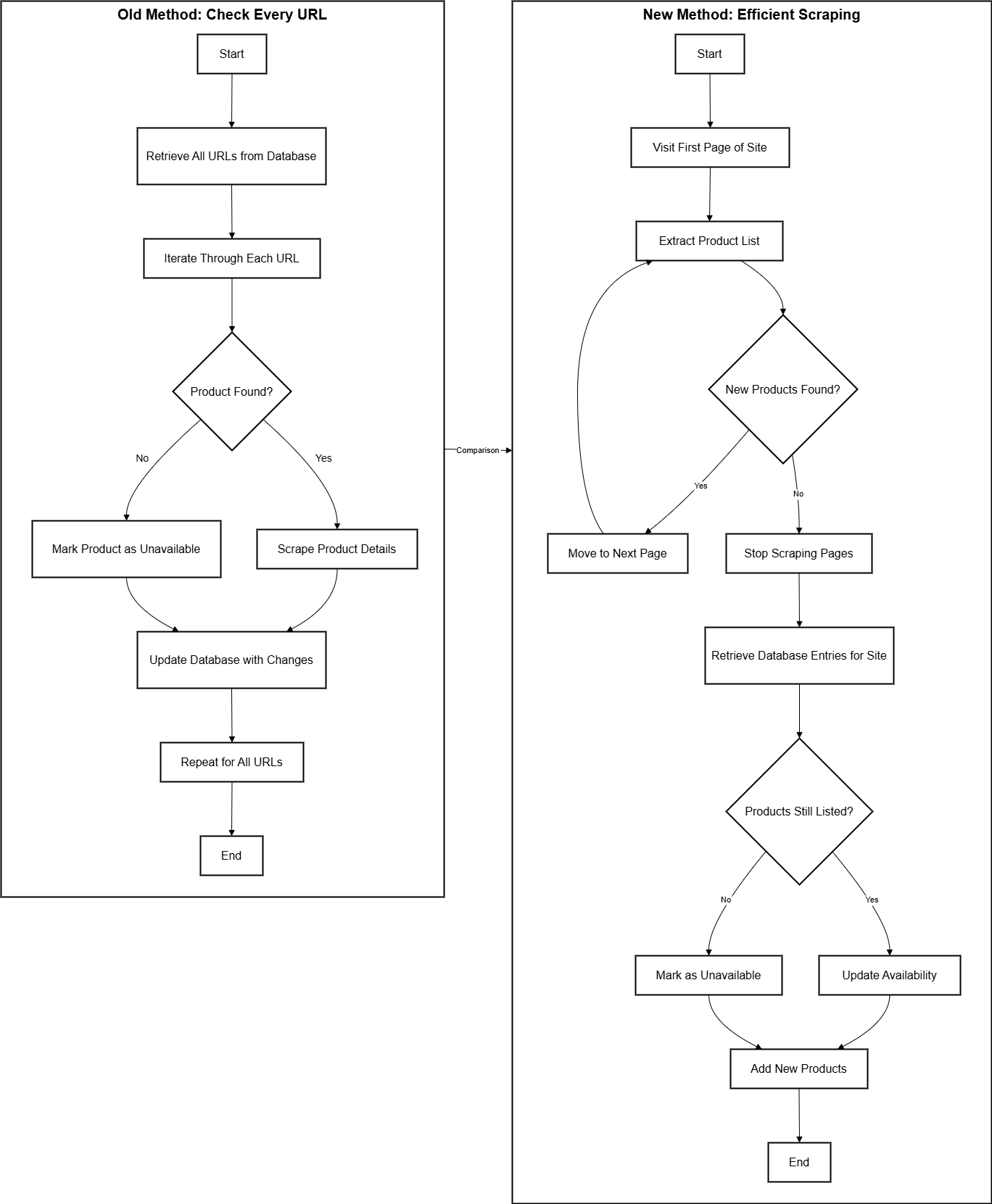
The diagram shows the evolution of my scraper from a brute-force approach to an optimized, efficient workflow.
Old method (left): The system would pull every product URL from the database and then check each one individually on the dealer’s site. This guaranteed accuracy but was painfully inefficient: thousands of unnecessary requests were made just to confirm that items hadn’t changed.
New method (right): Instead of starting from the database, the scraper now begins at the live site. It iterates through product listing pages, extracting all visible items. Once no new products are found, it stops scraping further pages—avoiding wasted work. The collected list is then compared against database entries to identify:
New products → inserted into the database.
Still-listed products → availability refreshed, price/metadata updated.
Missing products → marked as sold/unavailable.
Why it matters
This shift cut out tens of thousands of redundant lookups per run. By focusing on what the site currently shows, the scraper is faster, lighter on both my servers and the dealers’ websites, and far easier to maintain. Logging is still in place at every step, so debugging and auditing remain straightforward, but the workflow is now streamlined enough to run continuously at scale.

System at a Glance
Think of the scraper as a conveyor belt: raw pages go in, structured knowledge comes out. Each step has a single job, and together they turn messy dealer websites into clean, usable data.
Start with the site itself
The scraper doesn’t rely on assumptions. It goes straight to the dealer’s live product pages, just like a customer would, and starts reading what’s actually there.Turn pages into product lists
On each page, it identifies product tiles (the little blocks with title, price, and a thumbnail). This gives a quick snapshot of what’s being sold right now.Compare to memory (the database)
The scraper cross-checks those live tiles with what’s already stored:If something’s new → it gets added.
If something changed → it gets updated.
If something disappeared → it’s marked as sold.
Zoom in on details
When needed, the program clicks into the full product page to collect richer info like descriptions, multiple photos, or metadata.Store it cleanly
Every product is normalized: prices into a single currency, titles cleaned, images uploaded into structured folders. The result is a dataset that looks like it all came from one source, even though it didn’t.Keep a log of everything
Nothing happens in the dark — every step is logged. That means I can always answer: What changed? When? Why?
Balancing Freshness & Efficiency
Challenge
My early scraper design tried to re-crawl everything on every run. It worked, but it was painfully slow, burned unnecessary AWS resources, and put way too much strain on dealer websites.
Solution
I redesigned the update cycle to balance freshness with efficiency:
Lightweight checks – Every 10 minutes, the scraper quickly checks front pages for new products or changes.
Full refreshes – Every 12 hours, it does a deep crawl to catch any missed updates.
Change detection – It only pulls full product details when differences are detected, instead of downloading everything each time.
Result
This change cut scraping time from hours to minutes, reduced AWS costs, and made the system friendlier to dealer servers. The data stays fresh enough for real-time insights without overloading infrastructure or source sites.
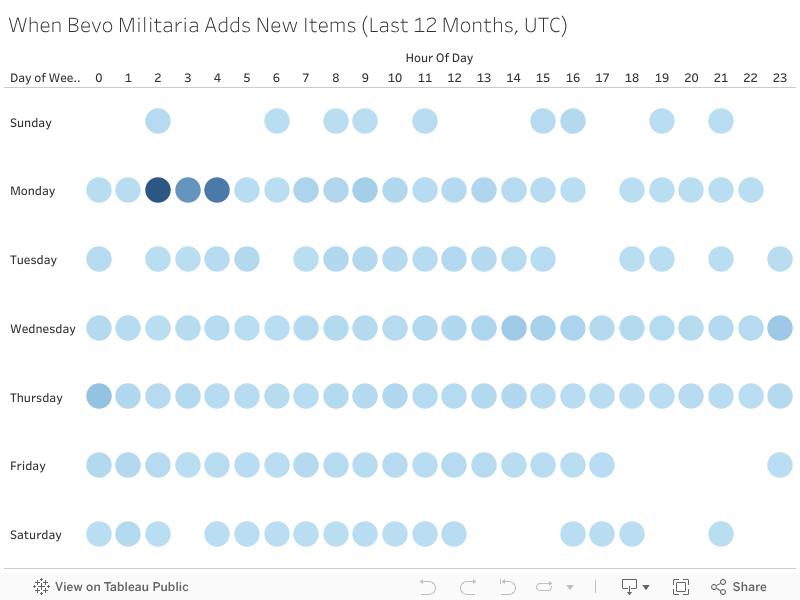
(Above) Most new listings on Bevo Militaria appear in the early morning (UTC), with activity peaking early in the week. This pattern is valuable for collectors looking to spot rare items quickly or track pricing trends in real time.
Adapting to Edge Cases
Challenge
Not every site played nice. Some relied heavily on JavaScript, others had unpredictable layouts, and my early approach of brute-forcing or using eval() for site-specific logic was fragile and insecure. On top of that, my first setup overwrote old data whenever prices or descriptions changed — which meant losing valuable historical information.
Solution
I reworked the system to handle these edge cases in a safer and more maintainable way:
Dynamic websites – Added Selenium support for JavaScript-heavy pages.
Site-specific configs – Built a JSON configuration format for selectors, availability rules, and post-processing. Much safer and easier to maintain than the old approach.
Historical tracking – Updated the database to store past prices and availability instead of overwriting them.
Smarter availability checks – Instead of brute-forcing every URL, the scraper now checks just the first few pages for new products and uses elimination to mark older ones as unavailable.
Result
These changes made the scraper more secure, faster, and cheaper to run. What used to be fragile and costly is now a system that can adapt to dynamic sites, preserve historical data, and stay efficient at scale.
Skills and Technologies
Data Collection & Processing
Python Scraper Framework – Custom-built, JSON-config driven scrapers for 100+ dealer sites.
Libraries: BeautifulSoup, Selenium, pandas, psycopg2, logging.
Historical Tracking – Database schema designed to store product changes over time.

Machine Learning & AI
Custom ML Model (scikit-learn) – TF-IDF + Logistic Regression classifier trained on 67k labeled products.
Confidence Thresholding – Per-class thresholds with calibrated probabilities.
OpenAI GPT API Fallback – Structured prompts for reliable classification when ML confidence is low.
Streamlit Labeling Tool – Built UI for batch labeling, human-in-the-loop corrections, and dataset growth.


Web Development & Applications
Django Web App (milivault.com) – Search, filter, and user collections powered by AWS + PostgreSQL.
Streamlit Tools – Labeling, SQL explorer, and batch confirmation UIs for internal workflows.
Render – Hosting for the Django site, integrated with AWS backend services.

Cloud Infrastructure
AWS EC2 – Runs scrapers and scheduled jobs.
AWS RDS (PostgreSQL) – Central database for 350k+ products and structured metadata.
AWS S3 – Storage for millions of product images.
IAM Roles & Security Groups – Configured for secure service-to-service communication.

Database Management
PostgreSQL – Optimized for cleaning, batch updates, and historical queries.
Schema Design – Structured to support classification fields (nation, conflict, item type) and user confirmations.
Query Optimization – Tuned for large-scale SELECT and UPDATE operations.

Version Control & Deployment
GitHub – Version control, collaboration, and issue tracking.
Secure Deployments – Automated deployments via SSH, with logging and monitoring for stability.